
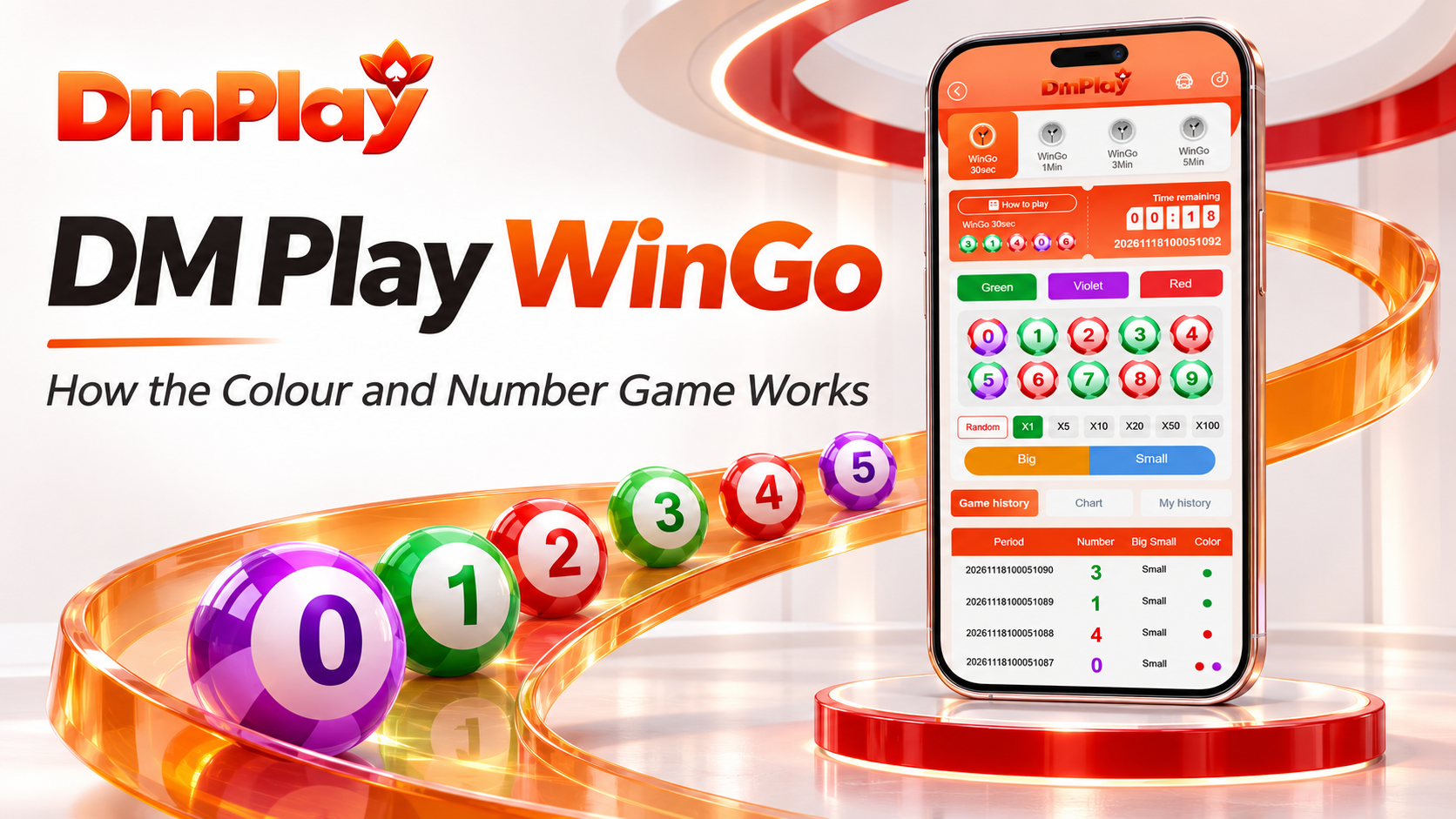
DMPlay WinGo: How the Colour and Number Game Works
DmPlay WinGo is a round-based colour and number game where one result connects three pieces of information: a digit, its colour and its Big or Small category. The layout brings these details together with a countdown, period number and result history, making the format easier to understand once you know what each part means.
There are four timing options: DM Play WinGo 30 seconds, 1Min, 3Min and 5Min. Their main difference is the length of each round. The number range and colour relationships give the game its familiar structure across these timing choices.
What Is DmPlay WinGo?
DmPlay WinGo belongs to the number and colour game category. Each completed period has a result from 0 to 9. That number also belongs to a size group and carries one or two colour labels.
This creates different ways to read the same outcome. For example, a result of 3 is a particular digit, a Small result and a Green result. Those descriptions are connected, but they are not identical selections.
The distinction matters when checking a record. A correct colour selection does not mean every number selection has matched. Likewise, a number can belong to the correct size group while differing from a particular digit someone selected.
Understanding the Main Game Screen
The DmPlay WinGo screen has several sections, each serving a clear purpose. At the top, the timing tabs let you move between the four game modes.
The countdown and period identifier describe the current round. Recent result balls provide a quick view of completed outcomes, while the lower history sections offer more detail.
Green, Violet and Red appear as separate colour choices. The ten numbered balls represent individual digits. Big and Small provide another classification, and the amount controls sit separately from those result labels.
The How to Play area is important because it explains the rules attached to the selected game. Review it when checking fees, timing or settlement information.
Colour and Number Rules
The WinGo colour game uses Green, Red and Violet. Most digits have one colour label, while 0 and 5 have two. Understanding these two special numbers prevents a common source of confusion.
| Result number | Colour classification | Size classification |
|---|---|---|
| 0 | Red and Violet | Small |
| 1 | Green | Small |
| 2 | Red | Small |
| 3 | Green | Small |
| 4 | Red | Small |
| 5 | Green and Violet | Big |
| 6 creme | Red | Big |
| 7 | Green | Big |
| 8 | Red | Big |
| 9 | Green | Big |
Green covers 1, 3, 7 and 9, with 5 also receiving a Green classification. Red covers 2, 4, 6 and 8, with 0 also receiving a Red classification. Violet applies to 0 and 5.
A result of 0 can therefore display two colour dots without representing two different numbers. The same applies to 5. It is one outcome carrying two colour labels.
These overlaps also affect the stated colour returns. A Green result of 5 is treated differently from Green results of 1, 3, 7 or 9 in the payout explanation. Red has a similar distinction for 0.
How Big and Small Work
Big and Small divide the ten digits into two groups. Small means 0, 1, 2, 3 or 4. Big means 5, 6, 7, 8 or 9.
The dividing point is between 4 and 5. This makes 4 Small and 5 Big, even though both sit close together in the number row.
Size and colour should be read separately. A Small result can be Green, Red or include Violet. A Big result can also be Green, Red or include Violet through the number 5.
For example, 6 is Big and Red, while 9 is Big and Green. Their size classification matches even though their colours differ.
The Four WinGo Round Timings
The timing tabs let visitors compare four round lengths. Each mode should be treated as its own sequence, so always check the selected tab when reading a period or result.
| Mode | Round length | Stated entry window | Scheduled rounds per day |
|---|---|---|---|
| 30 seconds | 30 seconds | 25 seconds | 2,880 |
| 1Min | 1 minute | 55 seconds | 1,440 |
| 3Min | 3 minutes | 2 minutes 55 seconds | 480 |
| 5Min | 5 minutes | 4 minutes 55 seconds | 288 |
These daily counts describe a continuous 24-hour schedule, not a recommended number of entries. The first three modes specify a five-second draw wait.
The five-minute instructions list a 4-minute-55-second entry window but also mention a 55-second wait. Those durations cannot both fit a five-minute round. A five-second remainder would fit mathematically, but the correct operational timing needs confirmation. Do not add 55 seconds to the advertised round length without clarification.
DM Play WinGo 30 seconds creates the most frequent round changes. The 1Min mode allows a longer interval, while the 3Min and 5Min modes leave more time between results.
Period Numbers and the Countdown
A period number is the identifier attached to a particular round. It connects the result, its timing mode and any account records associated with that round.
Long period identifiers can look similar, particularly when only the final digits change. Compare the full identifier when checking a result. A matching final digit alone is not enough.
The countdown shows the remaining time for the selected mode, but entry acceptance depends on the platform’s actual closing rules. A screen that has not refreshed may not reflect the latest server status.
Understanding Fees and Colour Returns
The colour-return example uses an amount of ₹100, deducts a ₹2 service fee and leaves a ₹98 contract amount. The stated multiplier is applied to ₹98 rather than ₹100.
The following calculations explain those rules. They are illustrations, not recommended spending amounts or forecasts.
| Colour selection | Matching result | Stated calculation | Gross return | Difference from ₹100 paid |
|---|---|---|---|---|
| Green | 1, 3, 7 or 9 | ₹98 × 2 | ₹196 | +₹96 |
| Green | 5 | ₹98 × 1.5 | ₹147 | +₹47 |
| Red | 2, 4, 6 or 8 | ₹98 × 2 | ₹196 | +₹96 |
| Red | 0 | ₹98 × 1.5 | ₹147 | +₹47 |
| Violet | 0 or 5 | ₹98 × 4.5 | ₹441 | +₹341 |
Gross return and net profit are different. A ₹196 return is not ₹196 profit when ₹100 was paid. The difference in that successful example is ₹96.
The special numbers explain why a matching Green or Red result can have a lower return. Green on 5 and Red on 0 use 1.5 times the contract amount in this example.
Reading DMPlay WinGo Results
The DM Play WinGo results table provides four main fields: Period, Number, Big Small and Color. Read across the same row to connect all four.
For a result of 3, the row should show Small and Green. A result of 6 should show Big and Red. A result of 0 should show Small with Red and Violet.
This gives you a simple checking order: identify the timing mode, confirm the period and then read its number, size and colour.
A recent result displayed near the countdown may belong to a completed period rather than the current one. Compare its identifier with the history table before connecting it to an account record.
What the Chart Statistics Mean
The Chart section presents results in a more visual form. It includes a statistical area covering the last 100 periods and a sequence of numbered rows joined by a line.
Frequency
Frequency records how often a number appeared within the stated sample. If a number has a frequency of 18 across 100 periods, it appeared 18 times in that window.
Missing and Average Missing
Missing generally describes the gap since a number last appeared. A larger figure means a longer recent absence under the chart’s counting method.
Maximum Consecutive
Maximum consecutive describes the longest recorded run of a number in the relevant sample. A value of four indicates a recorded run of four under the chart’s definition, not an instruction about the next outcome.
The Connecting Line
The line helps your eye follow changes between completed numbers. It can make the sequence easier to read, but its shape does not establish a future direction. A sharp rise, drop or repeated turn remains a drawing of past results.
Game History and My History
Game History records completed outcomes for the selected mode. My History is intended for reviewing entries associated with your account. Their purposes are connected but different.
A public result tells you what happened in a period. Your account record is needed to establish what selection was accepted, the relevant amount and its settlement status.
If the two seem inconsistent, match the mode and full period number first. Then compare the selected category and result. A Green selection and an exact-number selection should not be treated as the same entry.
Amount Multipliers and Random Selection
The interface includes controls labelled X1, X5, X10, X20, X50 and X100. These should be understood through the amount explanation or confirmation panel.
Such controls generally relate to the entry amount or quantity. They should not be confused with the colour payout multipliers described earlier. An X10 amount setting does not mean ten times the probability of a correct result.
Check the total displayed before confirming any account action. A larger amount can increase the money exposed to a loss without improving the underlying outcome.
Common Misunderstandings
One common mistake is reading 0 as Violet only. It carries both Red and Violet. Another is treating 5 as Small, even though it belongs to the Big group.
Timing can cause confusion too. Switching tabs changes the mode being viewed. A recent result in one mode should not be matched automatically with a period from another.
Chart statistics can also invite incorrect conclusions. A number missing for many rounds is not proved to be “due”. A frequently appearing colour is not proved to be more likely in the next period.
Checking Access and Getting Help
For DmPlay information, start at dmplayofficial.com. Check published domain information before following account links, and verify the final destination before entering personal details.
If a rule is unclear, ask a specific question. For the five-minute mode, ask for the correct entry-closing and draw-wait durations. For a settlement, provide the mode, period and relevant entry reference.
Teacher Lilly on Telegram is the provided support contact. Confirm current contact information through the website and compare usernames carefully. Clear questions and accurate records are more useful than repeatedly opening new requests about the same issue.
Our View of DmPlay WinGo
DmPlay WinGo has a clear presentation built around recognisable colours, ten numbers and four timing modes. The result table and chart offer useful ways to understand completed periods when their labels are read correctly.
Its strongest quality is the relationship between these sections: the number explains the colour and size, the period identifies the round, and account history provides the record for an individual entry.